Simple Task Killer Pro
Then it increases available memory, improves activity of the device, eventually minimizes battery consumption.
Free Simple Task Killing tool, is this !It has been designed for even beginners of an intelligent-phone to handle intuitively !
#Functions
- Momentarily termination of tasks- Transition to a detail page of application- Transition to an uninstall pane of application- Displays a ratio of CPU occupation- Displays available memory- Displays a quantity of remainder of the battery- The ignore-list which is used for registering applications to be excluded or masked- Registers recommended applications into the ignore-list- Terminates both applications and STK itself
#Features
1.
Non-resident software-Andriod2.3 or morePopular task-killing softwares are continuing to be activated, and consuming memories.
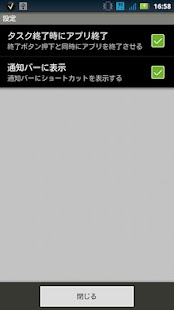
However, STK goes on the other way !STK quits itself very fast just after terminating its action by a RETURN or HOME button.Task-killing function itself continues to be a permanent resident ?
A nuisance, isn't it ?Such a contradictory feature shouldn't be implemented.
Just for this reason STK has been designed like that.
Especially, the following function would never be implemented now and in the future.
One-tap-killing by using widgetAutomatic-killing by supervising the activity of an application in background
Though the paid STK has similar one-tap-killing function to an widget, but big difference is non-resident behavior that has been fulfilled by using a quite unique short-cut.The users of ICS or later (Android 4.0 or more), can use this function, just try it !
2.
Fastest operationThe operation getting a task list is very much faster than that of pre-installed other task-killing applications or task managers !
3.
Particular looks
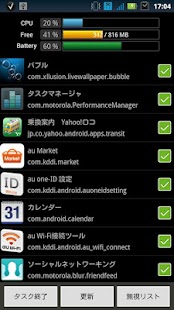
A ratio of CPU occupation, available memory, a quantity of remainder of the battery, are shown on a display.
That isn't cool enough !?
4.
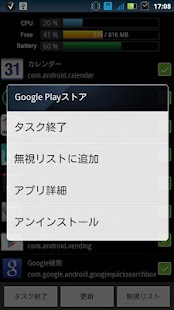
Manages active applicationsBy selecting a task from the task list pane, the management pane will appear, then you can uninstall an application or delete cache memory.
Therefore you would never be bothered to open the application management pane.
#Q&A
Q.
Want to kill application by one-toutch.
Doesn't STK implement an widget ?
A.
An widget is always a resident, so STK does not implement it.
Paid STK is equipped with a one-toutch killing function.
(Android4.0 or more)
Q.
Even after terminating a application, however it immediately appears again.
Why ?
A.
This is caused by the specification of Android OS.
The pre-installed application which belongs to the configuration type, that needs to be continuing activated such as Facebook, is structured to reboot automatically .
Any function can terminate operation of an application temporarily, but no function would be able to re-terminate such application that reboots itself even after terminated once.
Q.
Want STK that will not re-boot an application.
A.
STK's basic concept is not to implement a resident function, therefore STK has no plan to implement a supervisory function that requires an application to suppress self-reboot.
Q.
How to use the ignore-list ?
A.
Those applications registered in the ignore-list will disappear from the application list, which appears after STK is activated.This means that STK ignores whether they are operating or not.
In other words they have already been put outside of STK's management.Such applications that need to be always activated as "An alarm clock" and "E-mail", should not to be registered in the ignore-list to avoid a risk of terminating their operation.When add an application in the ignore-list, first tap its name in the application pane, then next pane will pop up, finally tap "Add to ignore list".
About Simple Task Killer Pro
- Package name (App ID)
- jp.co.aplio.simpletaskkiller
- Available on
- Google Play
- Price
- Free
- Version
- v2.05.00
- Developer
- Lookout Mobile Security
Looking for the Simple Task Killer Pro APK?
The safest way to get Simple Task Killer Pro (jp.co.aplio.simpletaskkiller) on your Android device is to install it directly from Google Play — you'll always get the latest official version, automatic updates, and no risk of modified or infected APK files from third-party sites.
Social Features
Connect and share with friends and the community.
Gaming Features
Enjoy immersive gaming experience with various game modes.
Weather Features
Get accurate weather forecasts and real-time updates.
See Simple Task Killer Pro in Action
Frequently Asked Questions
Is Simple Task Killer Pro free?
Yes, Simple Task Killer Pro is free to download and install on Android through Google Play.
How do I install Simple Task Killer Pro on Android?
Open Google Play on your Android phone or tablet, search for Simple Task Killer Pro by Lookout Mobile Security or tap the Google Play button on this page, then tap Install. The app downloads and installs automatically.
What is jp.co.aplio.simpletaskkiller?
jp.co.aplio.simpletaskkiller is the App ID (package name) of Simple Task Killer Pro on Google Play. Every Android app has a unique package name, and it is the safest way to verify you are installing the official app.
Is Simple Task Killer Pro safe to download?
Installing Simple Task Killer Pro from Google Play is the safest option: you get the official version published by Lookout Mobile Security, verified by Google Play Protect, with automatic updates. Avoid APK files from unofficial third-party sites.

Get Simple Task Killer Pro Today
Simple Task Killer Pro for Android — free download on Google Play.
Compatible with Android phones and tablets — available on Google Play.
Ask AI about this app
Get instant answers about features, tips and more from popular AI assistants.